An operating system must fulfill three requirements: multiplexing, isolation, and interaction. This chapter discuss how the OS organizaiotn provides the above three functions
1. Abstracting physical resources (Service As Resouces, boundary between applications)
OS abstract resouces into services is one way to provide strong isolation to forbid applications from directly accessing sensitive data.
For example, Unix applications interact with storage only through the file system’s open, read, write, and close system calls, instead of reading and writing the disk directly.
Another example is OS Scheduling service, which transparently switches hardware CPUs among processes, which avoid one process occupy CPU resources for long time
System Calls discussed in Chapter 1 is carefully designed to provide service to applicaitons while keep strong isolations between processes.
2. User mode, supervisor mode and machine mode (Boundary between Applicaiton and OS)
To achieve strong isolation, the operating system must arrange that applications cannot modify (or even read) the operating system’s data structures and instructions and that applications cannot access other processes’ memory
RISC-V CPU provides three mode: user mode, supervisor mode and machine mode, to support strong isolation between application and OS kernel.
Machine mode has full privilege and is used to configure a computer when CPU started to load the kernel.
Applciation run under user mode which has limited access to resouces. Application can not invoke kernel function directly but through system calls. When system call is inveoked. CPU will do a set of operations to transform to supervisor mode to verify the arguments the application provided. After system call executed, the CPU will go back to user mode.
3. Process (The unit of isolation)
The process abstraction prevents one process from wrecking or spying on another process’s memory, CPU, file descriptors, etc. The mechanisms used by the kernel to implement processes include the user/supervisor mode flag, address spaces, and time-slicing of threads.
A process’s most important pieces of kernel state are its page table, its kernel stack, and its run state (defined in proc struct). p->state indicates whether the process is allocated, ready to run, running, waiting for I/O, or exiting. p->pagetable holds the process’s page table, in the format that the RISC-V hardware expects。
Each process uses two stacks: user stack (in user space) and kernel stack (in kernel space). Each process has a thread of execution (or thread for short) that executes the process’s instructions. A process’s thread alternates between actively using its user stack and its kernel stack.
In summary, a process bundles two design ideas:
- an address space to give a process the illusion of its own memory,
- a thread, to give the process the illusion of its own CPU.
In xv6, a process consists of one address space and one thread.
Process memory lay out in user address space:
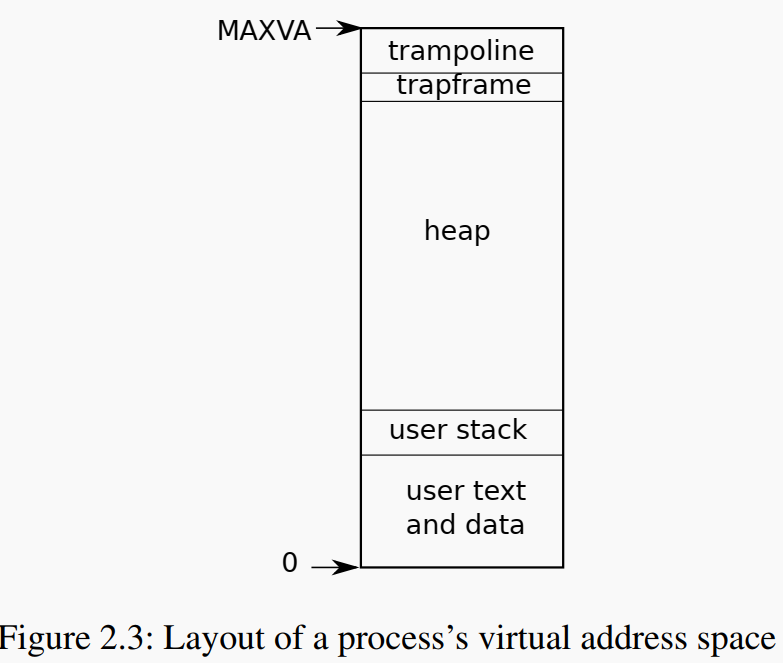
user.ld user process linker helps to set the process virtual addres memo layout during compile time
SECTIONS
{

  . = 0x0;
  .text : {}       // code text is stored in in the very bottom
  .rodata : {}     // read only const like string literal stores here
  .data : {}       // Initialized global/static variables go here
  .bss : {}        // Uninitialized global/static variables
4. code part: how kernel is loaded into memo
4.1. Bootloader loads the kernel binary into memory and set PC to _entry
During make, we produced the kernel ELF image which contains all the object files compiled under kernel.
Machine (CPU, memo, hard disk) is simulated by Qemu. The tradational way to load a kernel image is BIOS → bootloader → kernel. QEMU acts like a “cheat mode” BIOS/firmware. It loads the kernel ELF into RAM. Sets the PC (program counter) to the entry point. Begins executing
#-bios none, -kernel is loader from the kernel/kernel
# ~/xv6/syscall/kernel/kernel
QEMUOPTS = -machine virt -bios none -kernel $K/kernel -m 128M -smp $(CPUS) -nographic

qemu: $K/kernel fs.img
    $(QEMU) $(QEMUOPTS)
The linker script helps to build the initial address space layout for the kernel.
OUTPUT_ARCH( "riscv" )
ENTRY( _entry ) // <<< tells the linker to set the program couter to _entry
SECTIONS
{
  /*
   * ensure that entry.S / _entry is at 0x80000000,
   * where qemu's -kernel jumps.
   */
  . = 0x80000000;
...
LD = $(TOOLPREFIX)ld
LDFLAGS = -z max-page-size=4096
$K/kernel: $(OBJS) $K/kernel.ld $U/initcode
    $(LD) $(LDFLAGS) -T $K/kernel.ld -o $K/kernel $(OBJS) # <<< linker is used to link all the obj files produced under kernel/ dir to produce the kernel binary
4.1.1. what about the user space applications?
They are also compiled into binary, but stored in the fs
# example: sh.o is compiled into _sh binary
_%: %.o $(ULIB)
    $(LD) $(LDFLAGS) -T $U/user.ld -o $@ $^

UPROGS=\
    $U/_cat\
    $U/_echo\

# stores _cat ... binary into the file system
fs.img: mkfs/mkfs README $(UPROGS)
    mkfs/mkfs fs.img README $(UPROGS)
mkfs.c helps to create the file system: fs.img Disk layout
// Disk layout:
// [ boot block | sb block | log | inode blocks | free bit map | data blocks ]

1. Boot Block (Block 0)
Typically empty or unused in xv6-riscv. In x86 xv6, this would contain the bootloader.
QEMU doesn’t use it here (remember: kernel loaded via -kernel).

2. Superblock (Block 1)
Contains metadata about the file system:
    total size (in blocks),
    number of inodes,
    locations of the other regions
Defined in struct superblock (kernel/fs.h)

3. Log Blocks
Used for journaling (i.e., making file system writes atomic).
Before writing to inodes/data, changes go to log blocks.
Committed later for consistency (used in log.c).

4. Inode Blocks
Store struct dinodes — the on-disk representation of inodes.
Each inode describes a file or directory:
    file size
    block addresses (direct + indirect)

5. Free Bitmap Blocks
A bitmap tracking which data blocks are free or allocated.
1 bit per data block — 0 = free, 1 = used.
Used by balloc() when allocating a new data block.

6. Data Blocks
Hold actual file contents: e.g. /init, /sh, user files, etc.
Data blocks are pointed to by the addrs[] field in the inode.
user.ld user process linker helps to set the process virtual addres memo layout
SECTIONS
{

  . = 0x0;
  .text : {}       // code text is stored in in the very bottom
  .rodata : {}     // read only const like string literal stores here
  .data : {}       // Initialized global/static variables go here
  .bss : {}        // Uninitialized global/static variables
4.2. _entry to setup the stack for each CPU hart and call start
4KB stack for each CPU kernel/entry.S call start
4.3. start setup and return to supervisor moed for main
void
start()
{
  // ...
  // set M Exception Program Counter to main, for mret.
  // requires gcc -mcmodel=medany
  w_mepc((uint64)main);
  // ...
  // switch to supervisor mode and jump to main().
  asm volatile("mret");
}
4.4. main turn on page table, trap, fs and all init for the first process
4.5. userinit to create the very first user process from kernel
create first process (memo), and put code at the very top of memo and run the code to call exec to reload the memo with init binary
// a user program that calls exec("/init")
// assembled from ../user/initcode.S
// od -t xC ../user/initcode
uchar initcode[] = {
  0x17, 0x05, 0x00, 0x00, 0x13, 0x05, 0x45, 0x02,
  0x97, 0x05, 0x00, 0x00, 0x93, 0x85, 0x35, 0x02,
  0x93, 0x08, 0x70, 0x00, 0x73, 0x00, 0x00, 0x00,
  0x93, 0x08, 0x20, 0x00, 0x73, 0x00, 0x00, 0x00,
  0xef, 0xf0, 0x9f, 0xff, 0x2f, 0x69, 0x6e, 0x69,
  0x74, 0x00, 0x00, 0x24, 0x00, 0x00, 0x00, 0x00,
  0x00, 0x00, 0x00, 0x00
};

// Set up first user process.
void
userinit(void)
{
  struct proc *p;

  p = allocproc();
  initproc = p;

  // allocate one user page and copy initcode's instructions
  // and data into it.
  uvmfirst(p->pagetable, initcode, sizeof(initcode));
  p->sz = PGSIZE;
  // initcode becomes the user code that will be run at virtual address 0x0.
  // prepare for the very first "return" from kernel to user.
  p->trapframe->epc = 0;      // user program counter
  p->trapframe->sp = PGSIZE;  // user stack pointer, stack size 1 page

  safestrcpy(p->name, "initcode", sizeof(p->name));
  p->cwd = namei("/");

  p->state = RUNNABLE;

  release(&p->lock);
  // once run the exec will replace the first process memo layout with init binary
}